
Benutzer-Werkzeuge
Seitenleiste
linux:ovpnwebsrv
Dies ist eine alte Version des Dokuments!
Installation und Konfiguration OpenVPN Web Server
Der OpenVPN Webserver dient dazu die vorher erstellten VPN-Profile einfach vom Webserver zu downloaden. Es wird ausdrücklich nicht empfohlen den Webserver öffentlich erreichbar zu machen trotz Benutzer und Passwort Abfrage.
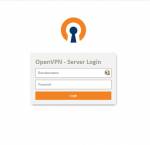
Installation Curl
apt install curl
Installation Sudo
apt install sudo
Installation Apache2
apt install apache2
Installation PHP Module
apt -y install php php-curl php-apcu php-fpm php-bcmath php-gd php-intl php-pear php-imap php-memcache libapache2-mod-php php-pspell php-tidy php-xmlrpc php-mbstring php-gmp php-json php-xml php-common wget -y
Installation OpenVPN WebServer
Navigieren zum Webserver Dokument Root
cd /var/www/html
Download des OpenVPN WebServers
wget https://cloud.it-mertens.de/index.php/s/S5JA7DmM35T653w/download/html.tar
Entpacken des TAR Archives
tar -xf html.tar
Anpassen des Speicherorts der OpenVPN Profile
nano /etc/pivpn/openvpn/setupVars.conf
Hier folgenden Eintrag ändern bzw. anpassen
install_home=/var/www/html
Ggf. vorhandene OpenVPN Profile ins neue Verzeichnis kopieren
cd /home/pi/ovpns
cp *.ovpn /var/www/html/ovpns/
linux/ovpnwebsrv.1677788690.txt.gz · Zuletzt geändert: 2023/04/02 00:59 (Externe Bearbeitung)